---
title: Création d'une vue avancée pour voir les revisites
description: Depuis le back-office DATA > dans votre audience > onglet contacts, vous avez la possibilité de créer des vues avancées. Vous pouvez notamment calculer, les revisites des participants, si votre évène
---
[Passer au contenu](https://help.inwink.com/fr/créer-une-vue-sur-data-pour-voir-les-revisites#main-content)
- [Français](https://help.inwink.com/fr/cr%C3%A9er-une-vue-sur-data-pour-voir-les-revisites)
- [English](https://help.inwink.com/create-a-view-on-data-to-see-the-revisits)
Français
Afficher le sous-menu pour les traductions
[Plus de support](https://help.inwink.com/fr/kb-tickets/new?hsLang=fr)
[](https://help.inwink.com/?hsLang=fr)
- [Knowledge base](https://support.inwink.com/)
- [My tickets](https://support.inwink.com/tickets)
Ouvrir la navigation principale
Fermer la navigation principale
- [Knowledge base](https://support.inwink.com/)
- [My tickets](https://support.inwink.com/tickets)
- - [Français](https://help.inwink.com/fr/cr%C3%A9er-une-vue-sur-data-pour-voir-les-revisites)
- [English](https://help.inwink.com/create-a-view-on-data-to-see-the-revisits)
Français
Afficher le sous-menu pour les traductions
- [Plus de support](https://help.inwink.com/fr/kb-tickets/new)
Bonjour ! Comment pouvons-nous vous aider ?
- Il n'y a aucune suggestion car le champ de recherche est vide.
1. [Centre d'aide](https://help.inwink.com/fr?hsLang=fr)
2. [Data](https://help.inwink.com/fr/data?hsLang=fr)
3. [Audience](https://help.inwink.com/fr/data?hsLang=fr#audience)
# Création d'une vue avancée pour voir les revisites
Depuis le back-office DATA \> dans votre audience \> onglet contacts, vous avez la possibilité de créer des [vues avancées.](https://help.inwink.com/fr/creer-des-vues-avancees-sur-votre-audience?hsLang=fr)
Vous pouvez notamment calculer, les revisites des participants, si votre évènement est sur plusieurs jours. **L'objectif ici est d'avoir la proportion des participants revenus sur les 2 jours (on exclut donc les participants venus 1 seul jour).**
Pour configurer cette vue des revisites participants, veuillez suivre les étapes suivantes :
- Rendez-vous dans votre back-office DATA \> votre audience \> onglet Contacts
- Cliquez sur les 3 petits points \> Voir... \> Vues contacts
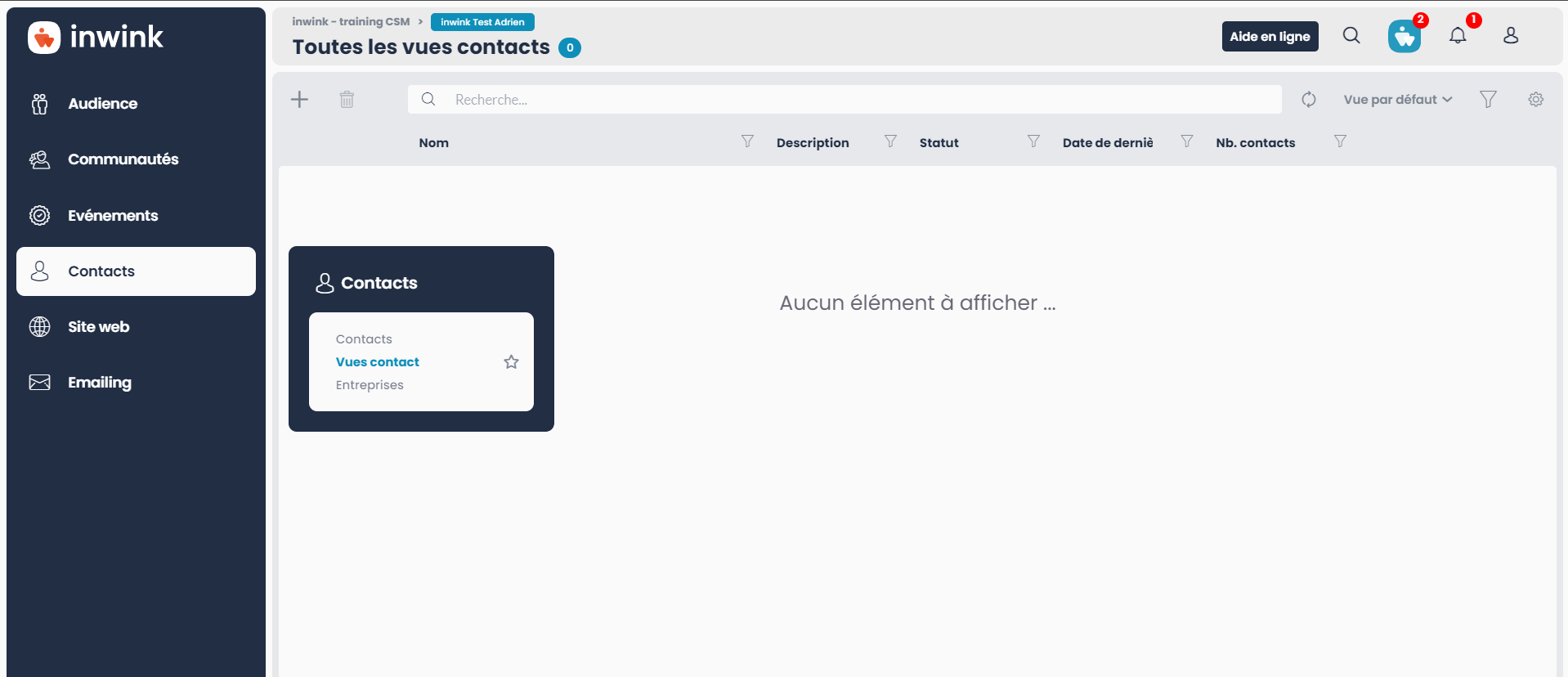
- Cliquez sur le **+** pour créer une nouvelle vue \> la nommer puis cliquez sur le bouton **"Configurer"** \> ajoutez une source de données
- Choisissez l'évènement souhaité \> et la **source de données = participants**
- Une fois la liste sortie, cliquez sur le bouton **"Filtrer"**, situé sur le bandeau noir

- Rendez-vous dans l'onglet **"Personnalisé"** \> Cochez l'option **"Présence sur site"**
- Choisissez la date et l'heure du jour 1 de votre évènement \> Enregistrez
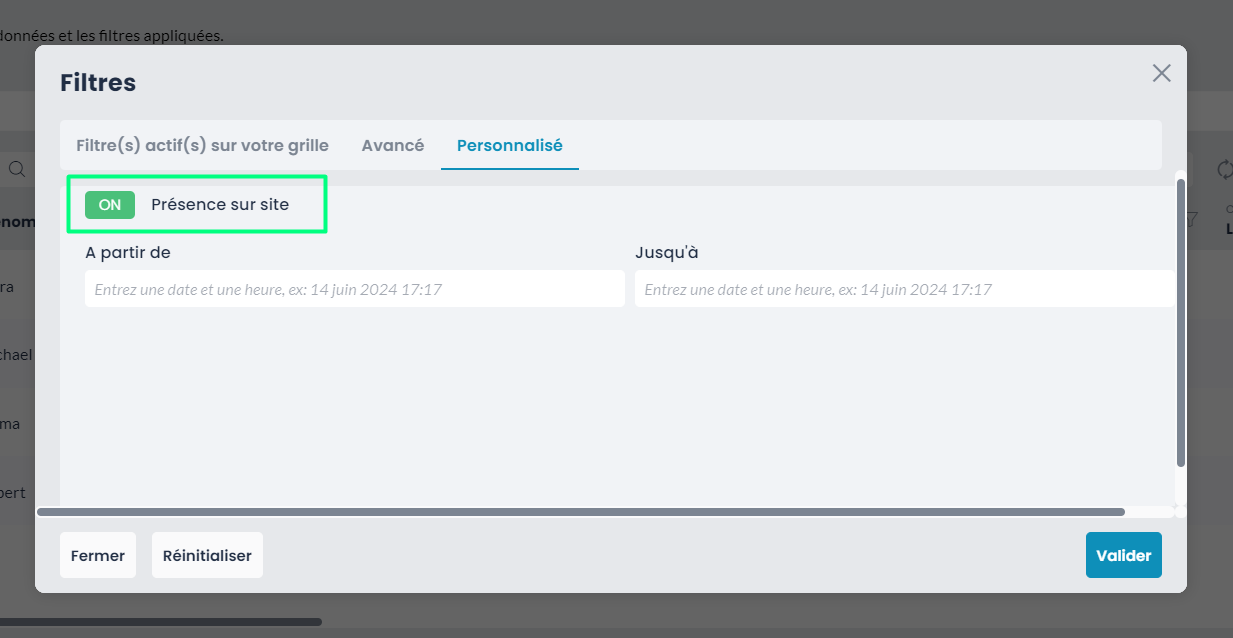
➡️ Vous voyez ici la liste des personnes présentes sur site le jour 1 de votre évènement
Ajoutez une condition en cliquant sur **"ET"**, afin de paramétrer le second jour en reconfigurant de la même manière que le premier jour (mais en changeant les dates et heures).
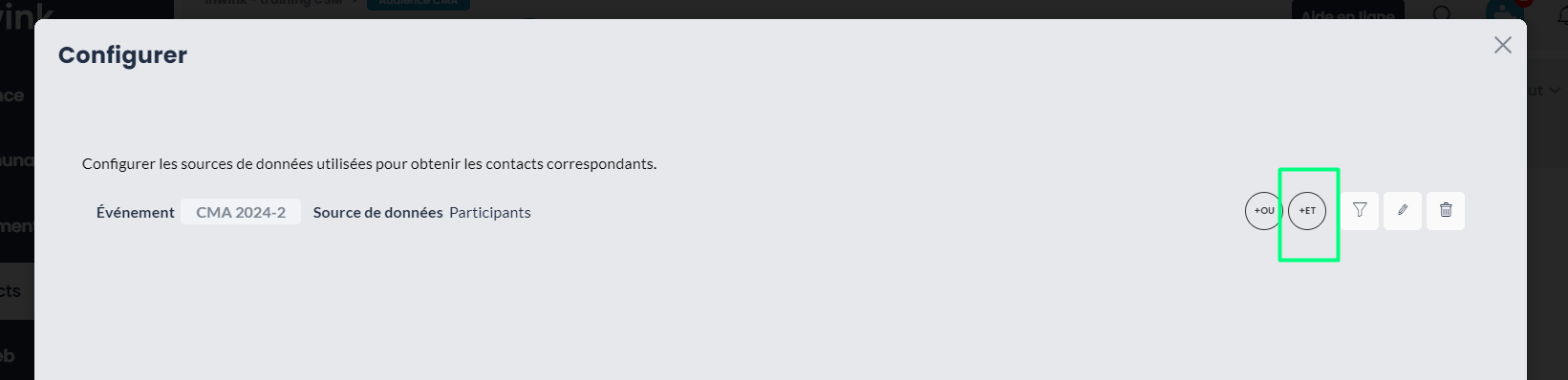
Validez ensuite pour voir apparaître la liste des personnes présentes sur site le jour 2.
Une fois validé, vous avez ainsi accès à cette nouvelle vue.
Pour la consulter, cliquez sur la petite flèche. Vous aurez ainsi la liste des participants revenus sur les 2 jours, sans compter les participants venus 1 seul jour.
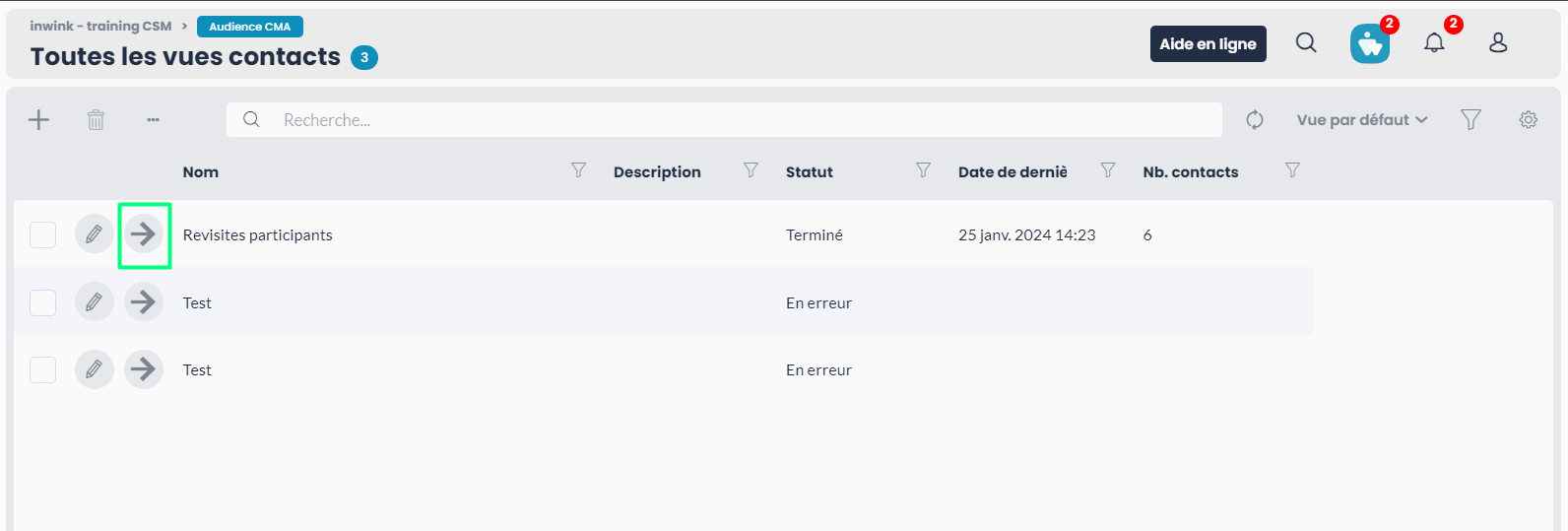
Pour mettre à jour cette liste, cliquez sur les 3 petits points \> Actions \> Lancer le calcul des contacts.
*➡️ Une vidéo tutorielle est disponible ci-dessous, vous montrant la configuration de la création d'une vue avancée pour les revisites.*
- [Les indispensables](https://help.inwink.com/fr/les-indispensables?hsLang=fr#main-content)
- [Grilles](https://help.inwink.com/fr/les-indispensables?hsLang=fr#grilles)
- [Les champs](https://help.inwink.com/fr/les-indispensables?hsLang=fr#les-champs)
- [Publier](https://help.inwink.com/fr/les-indispensables?hsLang=fr#publier)
- [Data](https://help.inwink.com/fr/data?hsLang=fr#main-content)
- [Audience](https://help.inwink.com/fr/data?hsLang=fr#audience)
- [Evènements](https://help.inwink.com/fr/ev%C3%A8nements?hsLang=fr#main-content)
- [Mon évènement](https://help.inwink.com/fr/ev%C3%A8nements?hsLang=fr#mon-%C3%A9v%C3%A8nement)
- [Participants](https://help.inwink.com/fr/ev%C3%A8nements?hsLang=fr#participants)
- [Programme](https://help.inwink.com/fr/ev%C3%A8nements?hsLang=fr#programme)
- [Espace intervenant](https://help.inwink.com/fr/ev%C3%A8nements?hsLang=fr#espace-intervenant)
- [Partenaires](https://help.inwink.com/fr/ev%C3%A8nements?hsLang=fr#partenaires)
- [Business Meetings](https://help.inwink.com/fr/ev%C3%A8nements?hsLang=fr#business-meetings)
- [Networking](https://help.inwink.com/fr/ev%C3%A8nements?hsLang=fr#networking)
- [Billetterie](https://help.inwink.com/fr/ev%C3%A8nements?hsLang=fr#billetterie)
- [Badge du participant](https://help.inwink.com/fr/ev%C3%A8nements?hsLang=fr#badge-du-participant)
- [inwink onsite](https://help.inwink.com/fr/ev%C3%A8nements?hsLang=fr#inwink-onsite)
- [Online events](https://help.inwink.com/fr/ev%C3%A8nements?hsLang=fr#online-events)
- [Intégration vidéo](https://help.inwink.com/fr/ev%C3%A8nements?hsLang=fr#int%C3%A9gration-vid%C3%A9o)
- [Session en ligne](https://help.inwink.com/fr/ev%C3%A8nements?hsLang=fr#session-en-ligne)
- [Interactions](https://help.inwink.com/fr/ev%C3%A8nements?hsLang=fr#interactions)
- [Intéractivité](https://help.inwink.com/fr/ev%C3%A8nements?hsLang=fr#int%C3%A9ractivit%C3%A9)
- [Appels à candidatures](https://help.inwink.com/fr/ev%C3%A8nements?hsLang=fr#appels-%C3%A0-candidatures)
- [Communauté](https://help.inwink.com/fr/communaut%C3%A9?hsLang=fr#main-content)
- [Contenus](https://help.inwink.com/fr/communaut%C3%A9?hsLang=fr#contenus)
- [Les forums](https://help.inwink.com/fr/communaut%C3%A9?hsLang=fr#les-forums)
- [Espace partenaire](https://help.inwink.com/fr/communaut%C3%A9?hsLang=fr#espace-partenaire)
- [Configuration](https://help.inwink.com/fr/communaut%C3%A9?hsLang=fr#configuration)
- [Les groupes](https://help.inwink.com/fr/communaut%C3%A9?hsLang=fr#les-groupes)
- [Adhésion](https://help.inwink.com/fr/communaut%C3%A9?hsLang=fr#adh%C3%A9sion)
- [Billetterie](https://help.inwink.com/fr/communaut%C3%A9?hsLang=fr#billetterie)
- [Tableaux de bord](https://help.inwink.com/fr/tableaux-de-bord?hsLang=fr)
- [Emailings](https://help.inwink.com/fr/emailings?hsLang=fr#main-content)
- [Envoyer des emails](https://help.inwink.com/fr/emailings?hsLang=fr#envoyer-des-emails)
- [Emails programmés](https://help.inwink.com/fr/emailings?hsLang=fr#emails-programm%C3%A9s)
- [Site web](https://help.inwink.com/fr/site-web?hsLang=fr#main-content)
- [Espace participant](https://help.inwink.com/fr/site-web?hsLang=fr#espace-participant)
- [CMS](https://help.inwink.com/fr/site-web?hsLang=fr#cms)
- [Webmaster](https://help.inwink.com/fr/site-web?hsLang=fr#webmaster)
- [Langues et traductions](https://help.inwink.com/fr/site-web?hsLang=fr#langues-et-traductions)
- [Espace partenaire](https://help.inwink.com/fr/site-web?hsLang=fr#espace-partenaire)
- [Identité visuelle](https://help.inwink.com/fr/site-web?hsLang=fr#identit%C3%A9-visuelle)
- [Les blocs](https://help.inwink.com/fr/site-web?hsLang=fr#les-blocs)
- [Formulaire d'inscription](https://help.inwink.com/fr/site-web?hsLang=fr#formulaire-dinscription)
- [Commercialisation](https://help.inwink.com/fr/commercialisation?hsLang=fr#main-content)
- [Comprendre et préparer sa commercialisation](https://help.inwink.com/fr/commercialisation?hsLang=fr#comprendre-et-pr%C3%A9parer-sa-commercialisation)
- [Construire ses offres commerciales](https://help.inwink.com/fr/commercialisation?hsLang=fr#construire-ses-offres-commerciales)
- [Configurer et accompagner le parcours exposant](https://help.inwink.com/fr/commercialisation?hsLang=fr#configurer-et-accompagner-le-parcours-exposant)
- [Application mobile](https://help.inwink.com/fr/application-mobile?hsLang=fr#main-content)
- [Avant de commencer](https://help.inwink.com/fr/application-mobile?hsLang=fr#avant-de-commencer)
- [Configurer et personnaliser l'application](https://help.inwink.com/fr/application-mobile?hsLang=fr#configurer-et-personnaliser-lapplication)
- [Tester et publier l'application](https://help.inwink.com/fr/application-mobile?hsLang=fr#tester-et-publier-lapplication)
- [Connecteurs](https://help.inwink.com/fr/connecteurs?hsLang=fr#main-content)
- [Paypal](https://help.inwink.com/fr/connecteurs?hsLang=fr#paypal)
- [Six Payment](https://help.inwink.com/fr/connecteurs?hsLang=fr#six-payment)
- [Power BI](https://help.inwink.com/fr/connecteurs?hsLang=fr#power-bi)
- [Adyen](https://help.inwink.com/fr/connecteurs?hsLang=fr#adyen)
- [Salesforce](https://help.inwink.com/fr/connecteurs?hsLang=fr#salesforce)
- [Hubspot](https://help.inwink.com/fr/connecteurs?hsLang=fr#hubspot)
- [Ingenico](https://help.inwink.com/fr/connecteurs?hsLang=fr#ingenico)
- [Zapier](https://help.inwink.com/fr/connecteurs?hsLang=fr#zapier)
- [Stripe](https://help.inwink.com/fr/connecteurs?hsLang=fr#stripe)
- [Marketo](https://help.inwink.com/fr/connecteurs?hsLang=fr#marketo)
- [Monetico](https://help.inwink.com/fr/connecteurs?hsLang=fr#monetico)
- [Lyra, PayZen et Sogecommerce](https://help.inwink.com/fr/connecteurs?hsLang=fr#lyra-payzen-et-sogecommerce)
- [Make](https://help.inwink.com/fr/connecteurs?hsLang=fr#make)
- [MCP](https://help.inwink.com/fr/mcp?hsLang=fr)
[](https://www.inwink.com/)
Copyright © 2025, inwink
```json
{
"@context" : "https://schema.org",
"@type" : "VideoObject",
"contentUrl" : "https://4673921.fs1.hubspotusercontent-na1.net/hubfs/4673921/Revisites_DATA.mp4",
"dateModified" : "2023-04-06T09:21:28.835Z",
"duration" : "PT2M43S",
"height" : 860,
"name" : "Revisites_DATA",
"thumbnailUrl" : "https://4673921.fs1.hubspotusercontent-na1.net/hubfs/4673921/Revisites_DATA.mp4/medium.jpg",
"uploadDate" : "2023-04-06T09:21:20.729Z",
"width" : 1600
}
```
```json
{
"@context" : "https://schema.org",
"@type" : "Organization",
"address" : {
"@type" : "PostalAddress",
"addressLocality" : "Paris, France",
"postalCode" : "75011",
"streetAddress" : "33 Rue du Faubourg Saint-Antoine"
},
"email" : "contact@inwink.com",
"funder" : [ {
"@type" : "Organization",
"name" : "Infinite Square",
"url" : "https://www.infinitesquare.com/"
} ],
"logo" : "https://www.inwink.com/hs-fs/hubfs/inwink-H-rgb-1.png?width=140&name=inwink-H-rgb-1.png",
"name" : "inwink",
"owns" : [ {
"@type" : "Product",
"name" : "inwink",
"url" : "https://www.inwink.com/"
} ],
"sameAs" : [ "https://www.linkedin.com/company/inwink/", "https://twitter.com/inwink_fr", "https://www.facebook.com/inwink-177090639388227/", "https://www.youtube.com/channel/UCWHQtvE5NEL7ijTKl4pGp0A" ],
"url" : "https://www.inwink.com/"
}
```